SearchDog Microsoft Edge 浏览器扩展安装与使用教程 SearchDog Microsoft Edge 瀏覽器擴充功能安裝與使用教程 SearchDog Microsoft Edge Extension Installation Guide

1

下载并解压插件压缩包 下載並解壓外掛壓縮包 Step 1: Download & Extract Extension Package

点击下方按钮下载 searchdog_chrome_extension.zip 扩展压缩包(Edge 完全兼容 Chromium 扩展协议),解压到本地电脑文件夹中(解压后的文件夹名称为 searchdog_chrome_extension):

searchdog_chrome_extension.zip ⚡ 立即下载插件包
💡 提示:解压后请保留该文件夹,在 Edge 浏览器成功加载扩展后,请勿删除或移动此本地文件夹路径。

點擊下方按鈕下載 searchdog_chrome_extension.zip 擴充功能壓縮包(Edge 完全相容 Chromium 擴充功能協議),解壓到本地電腦資料夾中(解壓後的資料夾名稱為 searchdog_chrome_extension):

searchdog_chrome_extension.zip ⚡ 立即下載外掛包
💡 提示:解壓後請保留該資料夾,在 Edge 瀏覽器成功載入擴充功能後,請勿刪除或移動此本地資料夾路徑。

Click the button below to download searchdog_chrome_extension.zip (compatible with Microsoft Edge) and extract it on your computer (folder name: searchdog_chrome_extension):

searchdog_chrome_extension.zip ⚡ Download Extension Zip
💡 Notice: Keep the extracted folder on your computer. Do not delete or rename the folder after loading it into Edge.
2

打开 Edge 扩展管理页面 打開 Edge 擴充功能管理頁面 Step 2: Open Microsoft Edge Extensions Page

在 Edge 浏览器地址栏中输入并按回车访问,或点击浏览器右上角的【…】设置与更多菜单 -> 选择【扩展】-> 点击【管理扩展】:

edge://extensions/

在 Edge 瀏覽器地址欄中輸入並按回車訪問,或點擊瀏覽器右上角的【…】設置與更多菜單 -> 選擇【擴充功能】-> 點擊【管理擴充功能】:

edge://extensions/

Open Microsoft Edge, type the following URL in the address bar and press Enter, or click 【…】 menu -> 【Extensions】 -> 【Manage extensions】:

edge://extensions/
3

开启开发者模式与加载解压缩扩展 開啟開發者模式與載入解壓縮擴充功能 Step 3: Enable Developer Mode & Load Unpacked

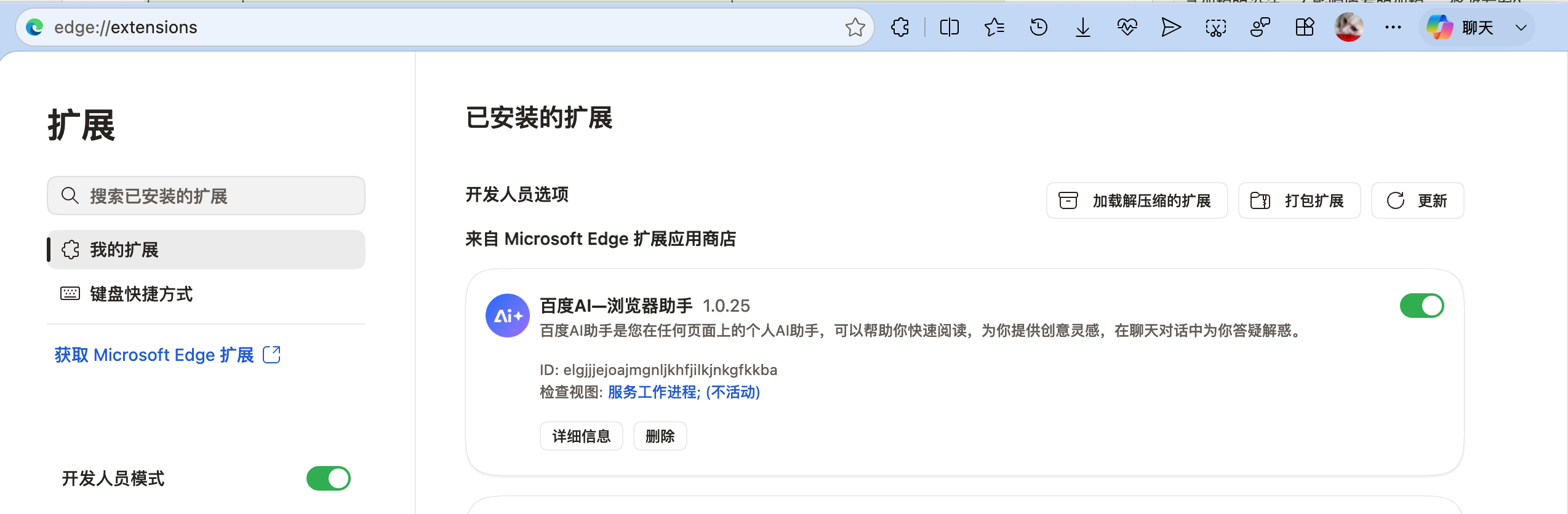
1. 在 Edge 扩展管理页面左侧菜单最下方,开启 【开发者模式】(Developer mode) 开关。

2. 点击顶部出现的 【加载解压缩的扩展】(Load unpacked) 按钮。

3. 在弹出框中选中步骤 1 中解压出来的 searchdog_chrome_extension 文件夹,点击“选择文件夹”。
1. 在 Edge 擴充功能管理頁面左側菜單最下方,開啟 【開發者模式】(Developer mode) 開關。

2. 點擊頂部出現的 【載入解壓縮的擴充功能】(Load unpacked) 按鈕。

3. 在彈出框中選擇步驟 1 中解壓出來的 searchdog_chrome_extension 資料夾,點擊“選擇資料夾”。

1. Toggle on 【Developer mode】 switch at the bottom left panel of Edge Extensions page.

2. Click the 【Load unpacked】 button at the top.

3. Select the extracted searchdog_chrome_extension folder from your computer and click "Select Folder".

Microsoft Edge 扩展管理及加载解压缩扩展界面截图
4

确认 SearchDog Agent 服务连接 確認 SearchDog Agent 服務連線 Step 4: Confirm the SearchDog Agent Connection

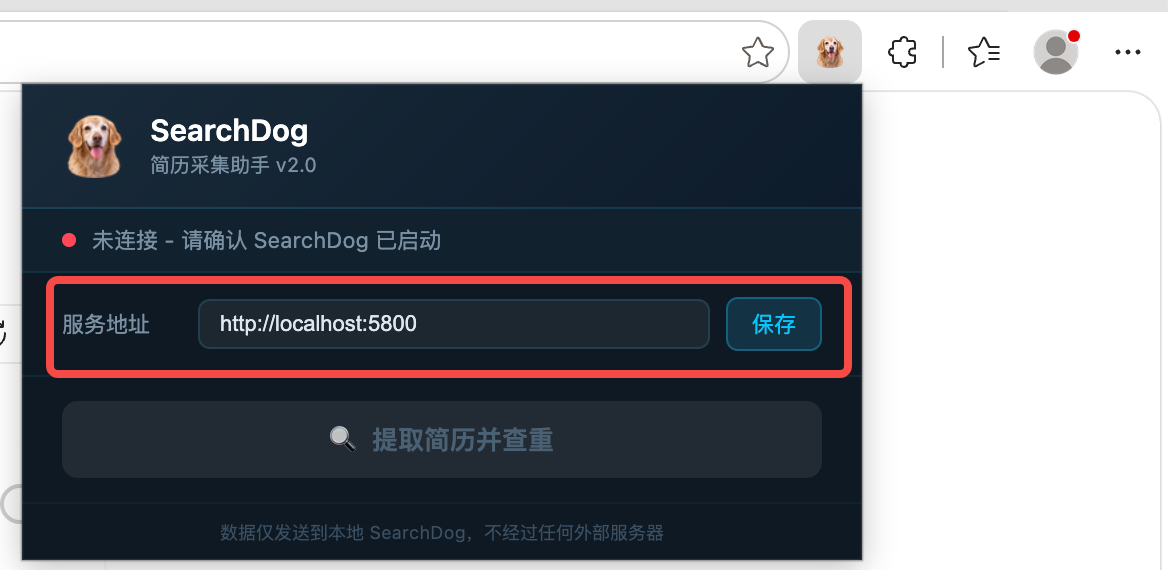
1. 点击浏览器右上角的【扩展程序】拼图图标 🧩,选择【SearchDog Agent】插件。

2. 如果是在 App 开启的机器上执行,服务地址不用修改。

3. 使用子账号在 App 开启之外的机器上操作时,需要把服务地址改成:

http://运行App机器的内网ip:5800

4. 插件页面会显示当前是否连接成功。
1. 點擊瀏覽器右上角的【擴充功能】拼圖圖示 🧩,選擇【SearchDog Agent】插件。

2. 如果是在 App 開啟的機器上執行,服務地址不用修改。

3. 使用子帳號在 App 開啟之外的機器上操作時,需要把服務地址改成:

http://執行App機器的內網ip:5800

4. 插件頁面會顯示目前是否連線成功。

1. Click the【Extensions】puzzle icon in the browser toolbar and select【SearchDog Agent】.

2. If you are working on the machine where the SearchDog App is running, keep the service address unchanged.

3. If a sub-account is working on a different machine, change the service address to:

http://Intranet-IP-of-the-App-Machine:5800

4. The extension shows whether the connection is currently successful.

Microsoft Edge 中 SearchDog Agent 插件服务地址设置界面截图
5

扩展三大核心功能与使用说明 擴充三大核心功能與使用說明 Step 5: Extension Core Features & Usage Guide

扩展程序连接成功后,打开 LinkedIn、脉脉、猎聘等招聘渠道网站,SearchDog 智能悬浮助手将自动唤起,提供以下三大核心功能:

📥
1. 简历一键导入系统: 在招聘渠道浏览候选人详情时,可一键将其简历抓取并同步保存至 SearchDog 本地人才库,并支持灵活选择加入指定的招聘项目。
🤖
2. 一键 AI 分析候选人 + 职位匹配: 一键自动发起 AI 深度画像分析,智能比对候选人履历与自建项目/监控岗位,即时输出精准评估与职位匹配建议。
🎯
3. 猎聘 / LinkedIn 自动寻访: 支持在猎聘和 LinkedIn 渠道对目标候选人发起自动寻访,提升主动触达效率。

擴充功能連線成功後,打開 LinkedIn、脈脈、獵聘等招聘管道網站,SearchDog 智能懸浮助手將自動喚起,提供以下三大核心功能:

📥
1. 簡歷一鍵導入系統: 在招聘管道瀏覽候選人詳情時,可一鍵將其簡歷抓取並同步保存至 SearchDog 本地人才庫,並支援靈活選擇加入指定的招聘項目。
🤖
2. 一鍵 AI 分析候選人 + 職位匹配: 一鍵自動發起 AI 深度畫像分析,智能比對候選人履歷與自建項目/監控崗位,即時輸出精準評估與職位匹配建議。
🎯
3. 獵聘 / LinkedIn 自動尋訪: 支援在獵聘和 LinkedIn 管道對目標候選人發起自動尋訪,提升主動觸達效率。

Once connected, SearchDog Extension automatically activates on recruitment platforms (LinkedIn, Liepin, etc.), bringing three core capabilities:

📥
1. One-Click Resume Import to System: Easily import candidate profiles directly into SearchDog local talent database, with option to assign them to specific recruitment projects.
🤖
2. One-Click AI Candidate Analysis & Job Matching: Perform deep AI evaluation of candidate experience, auto-matching skills against internal projects and target job opportunities.
🎯
3. Liepin / LinkedIn Auto Outreach: Automatically initiate outreach to target candidates on Liepin and LinkedIn to improve proactive engagement.
← 返回教程列表 下载 SearchDog 客户端